
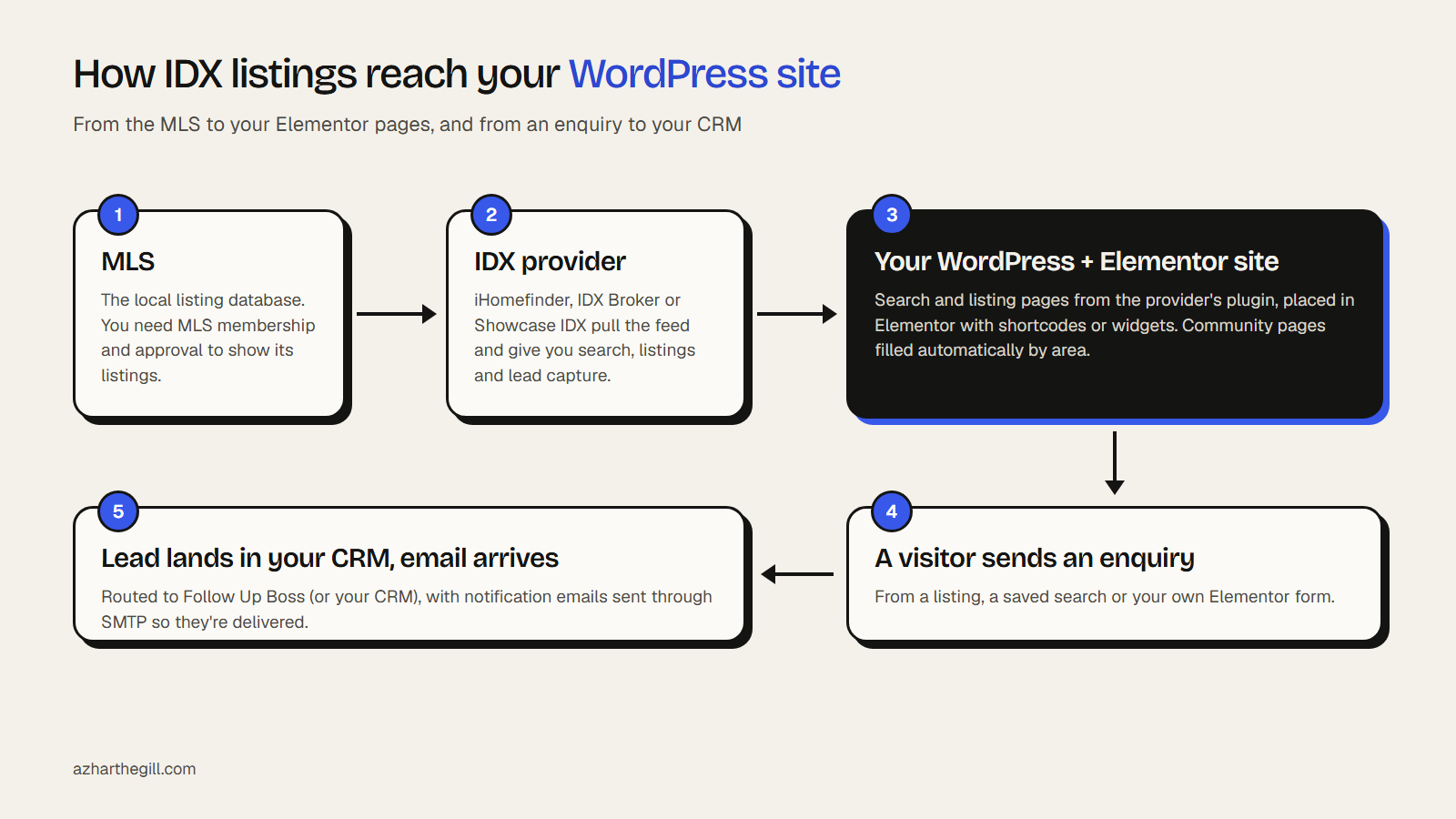
A real estate website without live listings is a brochure. With IDX, visitors can search properties on your own site, save searches and send enquiries straight to your CRM. Getting there means connecting several systems that weren’t built together: the MLS, an IDX provider, WordPress, Elementor and usually a CRM such as Follow Up Boss.
I’ve done this work as lead developer on a real estate platform built with WordPress and Elementor, with iHomefinder IDX, Ylopo running alongside and leads going into Follow Up Boss. This guide covers what I’d want an agent or agency to know before starting.
What is IDX?
IDX (Internet Data Exchange) is the system that lets a real estate agent or broker show MLS listings on their own website. Your MLS provides the listing data, an IDX provider turns it into searchable listings and property pages, and those appear on your site under the MLS’s display rules, such as required disclaimers and listing attribution.
What you need before you start
- MLS membership and IDX approval. IDX is generally available to licensed agents and brokers through their MLS. Most IDX providers handle the approval paperwork with your MLS, but it can take some time, so start it early.
- An IDX provider subscription. This is a monthly service that supplies the feed, search and property pages.
- A WordPress site you control, with decent hosting. Listing search pages are heavier than normal pages.
- A plan for leads. Decide where enquiries should go, such as Follow Up Boss or another CRM, before the site launches, not after.
Which IDX provider should you use?
Three names come up most often for WordPress sites. They differ mainly in how the listings are placed on your site and how much control you get over the layout. Features and pricing change, so check each provider’s current options and whether they cover your MLS before you commit.
| iHomefinder | IDX Broker | Showcase IDX | |
|---|---|---|---|
| WordPress plugin | Yes (Optima Express) | Yes (IMPress for IDX Broker) | Yes |
| How listings are added | Shortcodes and widgets inside your pages | Widgets and shortcodes, with full search pages traditionally served through a wrapper that matches your theme | Shortcodes inside your pages |
| Works in Elementor | Yes, through the Shortcode widget | Yes, for widgets and shortcodes | Yes, through the Shortcode widget |
| Worth checking | MLS coverage and CRM integrations | Where search pages live (your domain or a subdomain) | MLS coverage in your area |
Whichever you choose, the most important questions are practical: does it cover your MLS, does it send leads to your CRM, and can its listing pages be styled to match your site?
How to add IDX listings to Elementor pages
Most IDX plugins give you shortcodes for things like a search form, a featured listings grid or results for a particular area. In Elementor, you place these with the Shortcode widget, which is part of free Elementor.
- Install and connect the provider’s WordPress plugin with your account details.
- Generate the shortcode you need in the provider’s plugin or dashboard, for example listings for one city or ZIP code.
- In Elementor, add a full-width container and drop in a Shortcode widget with that code.
- Preview the page, not just the editor. Some IDX output only renders properly on the live page.
- Check it on a phone. Search forms and listing grids are where mobile layouts usually break.
One thing to expect: property detail pages are usually generated by the IDX plugin itself, not by Elementor. You can style them, but you often can’t design them in the Elementor editor like a normal page. Plan the design around that.
Community pages that fill themselves
Community or neighbourhood pages are where IDX and Elementor work best together. Each page combines content you write about the area with live listings filtered to that area, so the page stays current without anyone updating it.
- Build one Elementor layout for community pages and reuse it, so every area page looks consistent.
- Write genuinely local content for each area: schools, transport, what it’s like to live there. This is the part search engines value, because the listings themselves appear on many other sites too.
- Filter the IDX shortcode by the right field (city, ZIP code, subdivision or a custom area), then check that every page actually shows the right properties. On the platform I worked on, validating each community page was part of the job, because a filter that looks right can still return the wrong listings if the MLS records the area differently.
Getting IDX leads into Follow Up Boss
Leads come from two places, and they need to be handled separately:
- The IDX system itself: registrations, saved searches and enquiries on property pages. Many IDX providers can send these to CRMs like Follow Up Boss directly. Check that this integration exists for your provider and switch it on.
- Your own forms: contact forms, valuation requests and landing pages built in Elementor. These need their own connection to the CRM, for example through Elementor Forms’ webhook action, an automation tool, or Follow Up Boss’s API.
Then test both with real submissions and confirm each one arrives in the CRM with the right source and details. Also set up proper email delivery (SMTP) for the site’s notification emails. Without it, enquiry emails from WordPress often end up in spam or never arrive, and nobody notices until a lead is lost.
Does IDX help SEO?
Partly. How much depends on how the listings are delivered. Listings shown inside a frame, or on a separate subdomain, do less for your main site than listings Google can read on your own pages. But even when listings are on your domain, the same properties appear on many other agents’ sites and on the big portals, so they rarely make you stand out on their own.
The SEO value usually comes from what only you can provide: well-written community pages, guides for buyers and sellers in your area, and pages that answer local questions. IDX keeps those pages useful; your content gets them found.
Common IDX problems and what usually causes them
- Listings look broken or unstyled. The IDX plugin’s styles are clashing with your theme or Elementor’s. Fix it with targeted CSS for the IDX elements rather than changing your whole theme.
- Search pages are slow. Maps, large image grids and extra scripts add up. Limit what loads on each page, and keep heavy IDX widgets off pages that don’t need them.
- Listings don’t update, or show stale results. Page caching can store an old copy of an IDX page. Exclude listing and search pages from your caching plugin, or follow the provider’s caching guidance.
- The wrong properties appear on an area page. The filter field doesn’t match how your MLS records that area. Try another field, such as ZIP code instead of city, and check results against the MLS.
- Leads aren’t arriving. Either the CRM integration isn’t switched on for that lead source, the form isn’t connected, or the notification email isn’t being delivered. Test each path separately to find which.
When several systems are involved, the hardest part is often working out which one is at fault. On the platform I worked on, much of the job was exactly that: reproduce the problem, check what WordPress sent, check what the other system received, and only then change something. That way a fix in one place doesn’t quietly break another.
Frequently asked questions
Can I use IDX with the free version of Elementor?
Yes, for placing listings. The Shortcode widget is part of free Elementor. Elementor Pro becomes useful for site-wide templates, forms and popups around the listings.
Do I need to be a licensed agent to use IDX?
Generally yes. IDX access comes through MLS membership, which is for licensed agents and brokers. If you’re building a site for an agent, the IDX account and approval should be in their name.
Can I switch IDX providers later?
Yes, but each provider uses its own shortcodes and page structure, so every page with listings needs updating and old listing URLs will change. It’s much easier to choose carefully at the start.
Need IDX set up on your WordPress site?
I build and fix real estate sites on WordPress and Elementor, including IDX listings, community pages, CRM connections and email delivery, for agents and for agencies working white-label. See the real estate case study or send a brief.